> For the complete documentation index, see [llms.txt](https://docs.jedidesk.com/llms.txt). Markdown versions of documentation pages are available by appending `.md` to page URLs; this page is available as [Markdown](https://docs.jedidesk.com/english/chatbots/getting-a-ready-made-chatbot-token-in-telegram.md).

# Getting a ready-made chatbot token in Telegram

Tutorial for getting an API token for integration with #jedidesk

The [@BotFather](https://t.me/botfather) bot must be launched from the account (phone number) on which your chatbot was created.

Enter the **/mybots** command and select the bot you need for integration from the list.

Click on the **API token** button:

<figure><img src="https://2421713157-files.gitbook.io/~/files/v0/b/gitbook-x-prod.appspot.com/o/spaces%2FizQzM1n6iqF17cIYxrec%2Fuploads%2FWZO91npV4mB0bcVM0ExB%2FENG_Integrations_Telegram_1.png?alt=media&amp;token=5d79d438-fd66-4bcf-9933-e5eab96a182a" alt=""><figcaption><p>System menu</p></figcaption></figure>

***

Click on the API, it will be copied automatically:

<figure><img src="https://2421713157-files.gitbook.io/~/files/v0/b/gitbook-x-prod.appspot.com/o/spaces%2FizQzM1n6iqF17cIYxrec%2Fuploads%2FCCmSc3m49KBmLMAc66LH%2FENG_Integrations_Telegram_2.png?alt=media&amp;token=fd768d25-6c61-49cd-93e7-baf446d3ca71" alt=""><figcaption><p>The chatbot's unique API token</p></figcaption></figure>

***

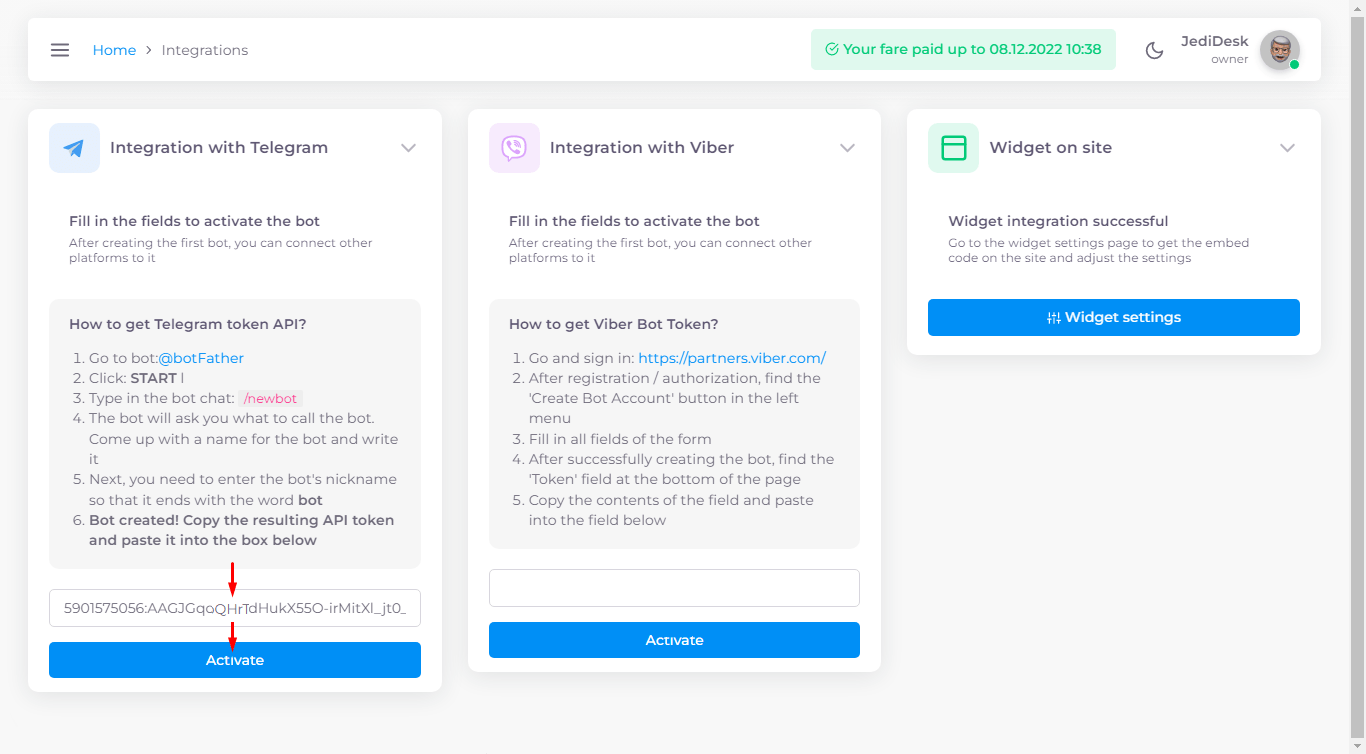
On the #jedidesk service, open the **Settings ->** [**Integrations**](https://app.jedidesk.com/integrations) tab, paste the copied API token and click <mark style="background-color:blue;">**Activate**</mark>:

<figure><img src="https://2421713157-files.gitbook.io/~/files/v0/b/gitbook-x-prod.appspot.com/o/spaces%2FizQzM1n6iqF17cIYxrec%2Fuploads%2Fzif43BPfJ9LBtWv8Z0mi%2FENG_Telegram_7.png?alt=media&amp;token=058d2ed1-a400-4561-a292-f7ee3443eef7" alt=""><figcaption><p>Chatbot integration with #jedidesk</p></figcaption></figure>